AST - A Super Tool (for deobfuscation)
I recently used an AST to deobfuscate JavaScript and liked it enough to write a short post encouraging others to try it.
Introduction
First of all, I did not invent anything here. I highly recommend you check out steakenthusiast’s blog about AST. This post re-explains some core concepts and provides additional deobfuscation snippets.
What is an AST
Programming languages are often described as either compiled (C, C++, Go) or interpreted (Python, JS, Java). In both cases, the code written by a human must be understood by a program that knows the language’s syntax and can translate those instructions into machine code. The main difference between compiled and interpreted languages is when that translation happens.
There is a program on your computer that can parse the code you copy-pasted from your favorite AI model. So how does it work? The answer is the AST.
An AST, or Abstract Syntax Tree, is the structural representation of source code where each node denotes a language construct (expressions, statements, declarations, etc.).
As an example, the following JS code:
klcium = "OwO"
has the following syntax tree:
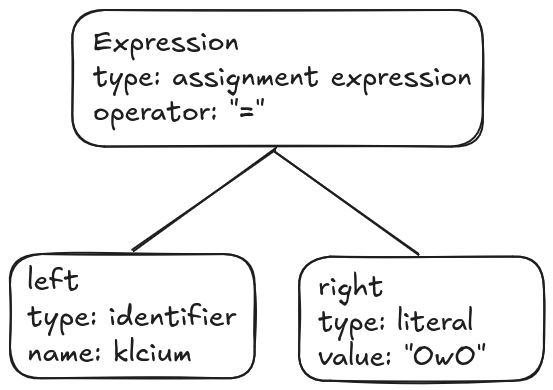
When parsing the source file, the interpreter will know that at this point of execution the klcium variable holds the string OwO.
Now if we obtain the string via a function call:
klcium = getOwO("plz")
The AST will look like this: 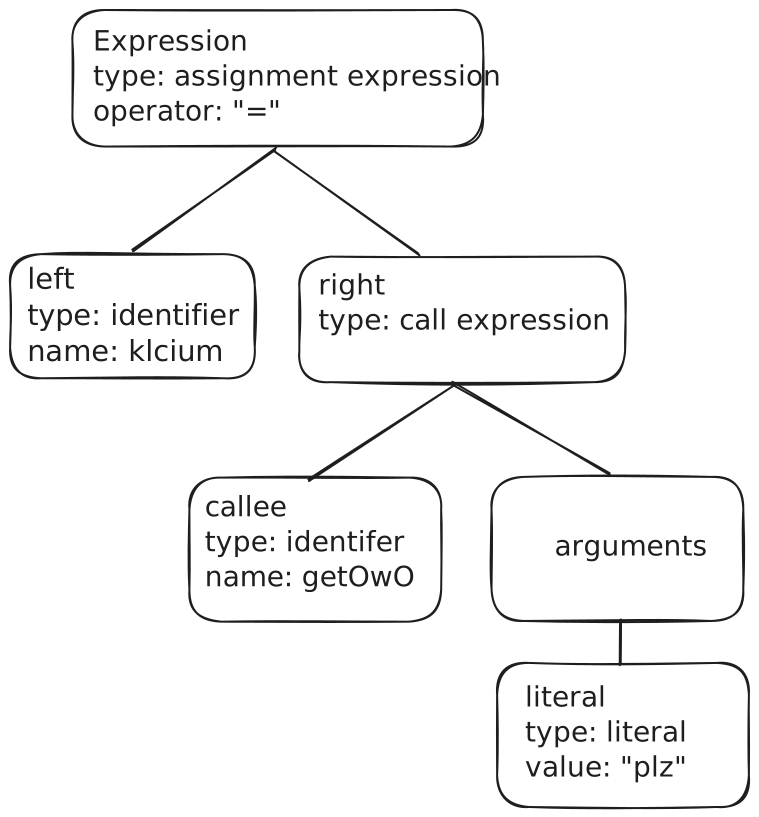
As you can see, the "OwO" literal is now produced by a call expression with an identifier as the callee and a literal as its sole argument.
The JSON representation of this tree is as follows:
1
2
3
4
5
6
7
8
9
10
11
12
13
14
15
16
17
18
19
20
21
22
23
24
25
26
27
28
29
30
31
32
33
34
35
36
37
38
{
    "type": "ExpressionStatement",
    "start": 0,
    "end": 22,
    "expression": {
    "type": "AssignmentExpression",
    "start": 0,
    "end": 22,
    "operator": "=",
    "left": {
        "type": "Identifier",
        "start": 0,
        "end": 6,
        "name": "klcium"
    },
    "right": {
        "type": "CallExpression",
        "start": 9,
        "end": 22,
        "callee": {
        "type": "Identifier",
        "start": 9,
        "end": 15,
        "name": "getOwO"
        },
        "arguments": [
        {
            "type": "Literal",
            "start": 16,
            "end": 21,
            "value": "plz",
            "raw": "\"plz\""
        }
        ],
        "optional": false
    }
    }
}
If you want to fiddle with AST representations of JavaScript and various other languages, I recommend the astexplorer.net website.
Deobfuscating JS using Babel
Now that you have a basic understanding of ASTs, let’s see how they can be used to deobfuscate nasty JS scripts.
Example
Let’s assume the following example:
1
2
3
4
5
6
7
8
9
10
11
12
13
14
15
16
var a = [110, 86, 110];
a.OwO = hidden;

function c(s) {
  let out = "";
  for (let i of s) {
    out += String.fromCharCode(i.charCodeAt() ^ 0x21);
  }
  return out;
}

function hidden() {
  console.log("How did you find me?");
}

a[c("nVn")]();
The program prints:
1
How did you find me ?
As you may have guessed, c("nVn") returns the property name "OwO", whose value is the function hidden. Wouldn’t it be simpler to read if the call were directly a["OwO"]()?
Yes — for this we will use Babel.
Babel
Babel is a JavaScript transpiler that parses source code into an AST. Although commonly used for transpilation, that’s not our goal in this post.
This kind of AST transformation is useful to:
- Replace calls to
c()with their computed output values. - Find references to the
aobject and simplify indirect property calls when possible.
I won’t explain Babel in detail here; instead I’ll provide a minimal harness you can use to build a deobfuscator.
1
2
3
4
5
6
7
8
9
10
11
12
13
14
15
16
17
18
19
20
21
22
23
24
25
26
27
28
29
30
31
32
const fs = require('fs');
const beautify = require("js-beautify").js;
const path = require('path');
const traverse = require("@babel/traverse").default;
const t = require("@babel/types");
const generate = require("@babel/generator").default;
const parser = require("@babel/parser");


const input_name = "./obf.js"
const inputPath = process.argv[2] || input_name;
const outPath = "./deobf.js";

const code = fs.readFileSync(inputPath, "utf8");
const ast = parser.parse(code, {
  sourceType: "module",
  plugins: ["jsx", "classProperties", "optionalChaining"]
});


// Imported functions here

// Core deobfuscation logic here


// Generate
const output = generate(ast, { jsescOption: { minimal: true } }).code;

// Write out
fs.writeFileSync(outPath, output);
console.log(`Done! ${outPath}`);
Replacing function calls
Using astexplorer, calls to c() are represented as CallExpression nodes. We will write a traverser that:
- Finds call expressions.
- Checks whether the callee is an identifier named
c. - Validates the argument and evaluates it.
- Replaces the call with the computed string literal.
1
2
3
4
5
6
7
8
9
10
11
12
13
14
15
16
17
18
19
20
21
22
23
24
25
26
27
28
29
30
31
32
33
34
35
36
37
38
// Import of the deobfuscation objects here
function hidden(){return null}
var a = [110, 86, 110];
a.OwO = hidden;
function imported_c(s) {
  let out = "";
  for (let i of s) {
    out += String.fromCharCode(i.charCodeAt() ^ 0x21);
  }
  return out;
}

// Core deobfuscation logic here
traverse(ast, {
  CallExpression(path) {
    // 1. Ensure callee is an identifier named "c"; otherwise skip.
    if (!t.isIdentifier(path.node.callee)) {
      return;
    }
    if (path.node.callee.name !== "c") {
      return;
    }

    // 2. Get the argument and check there is exactly one string literal.
    const args = path.node.arguments;
    if (args.length !== 1) {
      return;
    }
    if (!t.isStringLiteral(args[0])) {
      return;
    }

    // 3. Compute the value and replace the call with the string literal.
    const arg = args[0].value;
    const out = imported_c(arg);
    path.replaceWith(t.stringLiteral(out));
  }
});
If we add the above code in our harness and execute it, we get the following output file:
1
2
3
4
5
6
7
8
9
10
11
12
13
14
15
var a = [110, 86, 110];

function c(s) {
  let out = "";
  for (i of s) {
    out += String.fromCharCode(i.charCodeAt() ^ 0x21);
  }
  return out;
}

function hidden() {
  console.log("How did you find me ?");
}

a["OwO"]();
As you can see, c("nVn") was replaced by "OwO".
Few references
Here are a few visitors I like and recommend:
- bracketToDotVisitor: Converts a[“OwO”] format to a.OwO
- deleteEmptyStatementsVisitor, simplifyIfAndLogicalVisitor: to remove dead code